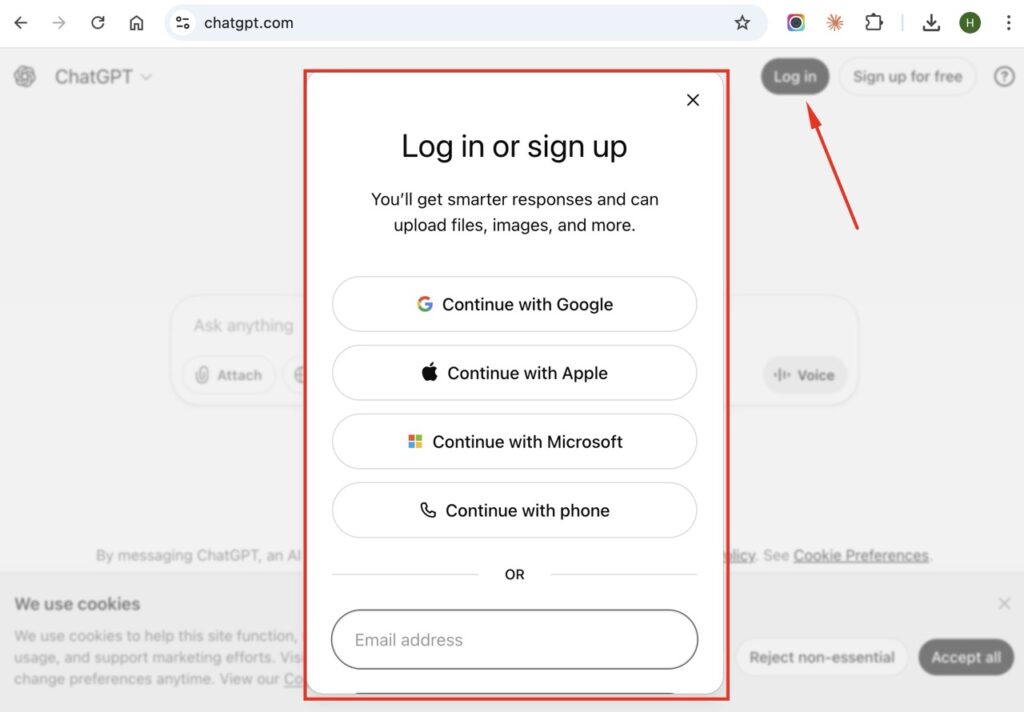
Go to chatgpt.com, sign up for a free account using your email or Google/Microsoft/Apple login, and start typing in the message box at the bottom of the screen. ChatGPT responds to whatever you ask—questions, writing requests, coding help, brainstorming, or just conversation.
ChatGPT is an AI chatbot made by OpenAI. It understands natural language, so you don’t need special commands or syntax. Just write what you want like you’re texting a knowledgeable friend.
Getting Started with ChatGPT
Step 1: Create an Account
Visit chat.openai.com and click “Sign up.” You can register with your email address or sign in directly with a Google, Microsoft, or Apple account. Verify your email and phone number to complete registration.
Step 2: Start a Conversation
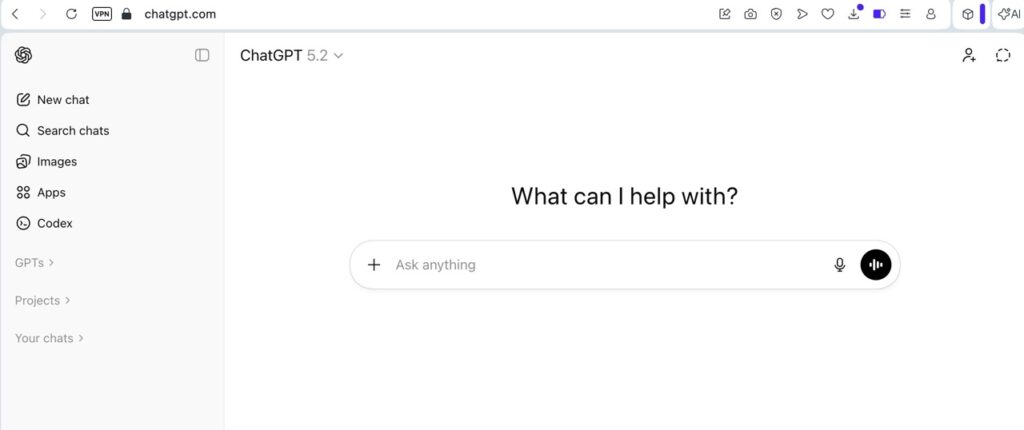
Once logged in, you’ll see a chat interface with a text box at the bottom. Type your question or request and press Enter (or click the send arrow). ChatGPT generates a response within seconds.
Step 3: Continue the Conversation
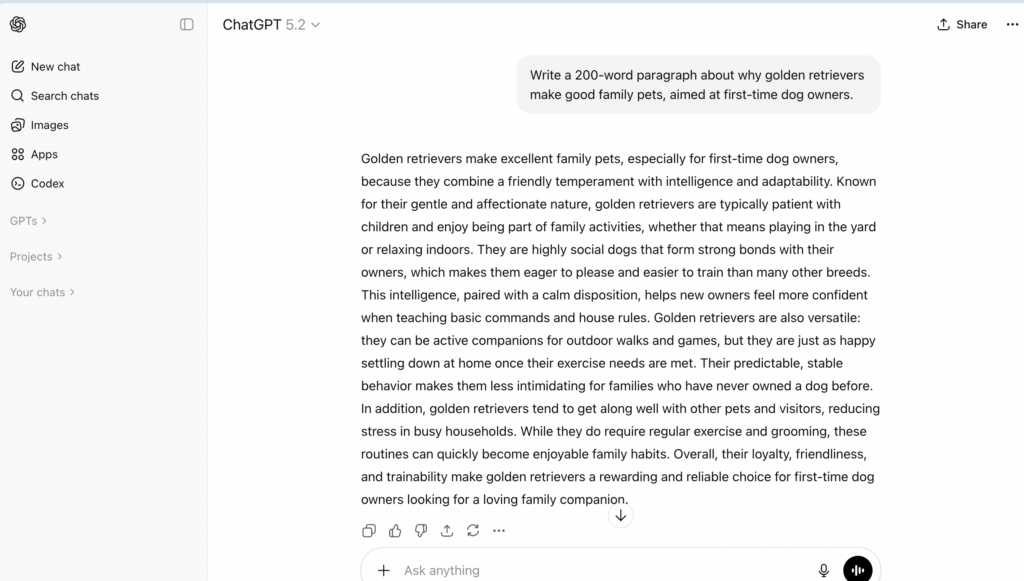
ChatGPT remembers context within a conversation. You can ask follow-up questions, request changes, or dive deeper into a topic without repeating yourself. Start a “New chat” from the sidebar when you want to switch topics completely.
What Can ChatGPT Do?
Answer Questions
Ask about history, science, math, cooking, travel, technology, or almost any topic. ChatGPT draws from a broad knowledge base, though it has a training cutoff date and may not know very recent events.
Write Content
Request emails, essays, cover letters, social media posts, product descriptions, or creative writing. Specify the tone (professional, casual, funny) and length you need.
Help with Code
ChatGPT can write code, explain programming concepts, debug errors, and convert code between languages. Paste your code directly into the chat for help.
Brainstorm Ideas
Use it for business names, gift ideas, trip planning, content topics, or solutions to problems. Ask for multiple options and it will generate lists.
Summarize and Explain
Paste long text and ask for a summary. Request explanations of complex topics “like I’m 10 years old” or at whatever level you need.
Edit and Improve
Share your writing and ask ChatGPT to proofread, improve clarity, make it more concise, or adjust the tone.
How to Write Good Prompts
The quality of ChatGPT’s response depends heavily on how you ask. Vague questions get generic answers. Specific prompts get useful results.
Be Specific
Instead of “Write about dogs,” try “Write a 200-word paragraph about why golden retrievers make good family pets, aimed at first-time dog owners.”
Give Context
Tell ChatGPT who you are, who the audience is, and what you’re trying to accomplish. “I’m a real estate agent writing to first-time homebuyers” gets better results than just “write an email about buying a house.”
Specify Format
Request bullet points, numbered lists, tables, or specific word counts. Ask for headers if you want structured content.
Ask for Revisions
If the first response isn’t quite right, don’t start over. Say “Make it shorter,” “Use simpler language,” “Add more examples,” or “Try a different approach.”
Use Examples
Show ChatGPT what you want by including an example. “Write social media posts like this one: [your example]” helps it match your style.
Example Prompts That Work Well
For Writing:
“Write a professional email declining a meeting invitation. Keep it polite and suggest rescheduling for next week.”
For Learning:
“Explain how compound interest works. Use a simple example with $1,000 invested over 10 years.”
For Problem-Solving:
“I’m planning a 7-day trip to Japan in April. Create a day-by-day itinerary covering Tokyo and Kyoto, focusing on cultural experiences and good food.”
For Coding:
“Write a Python function that takes a list of numbers and returns only the even ones. Add comments explaining each step.”
For Brainstorming:
“Give me 10 YouTube video ideas for a channel about personal finance aimed at people in their 20s.”
Free vs. Paid Plans
ChatGPT offers several tiers: Free, Go ($8/month), Plus ($20/month), and Pro ($200/month).
Free Version Includes:
- Access to GPT-5.2 with usage limits
- Basic chat, file uploads, and web browsing
- Slower responses during peak times
- May include ads in the future
ChatGPT Go ($8/month) Includes:
- GPT-5.2 Instant with higher message limits
- More image creation and file uploads
- Longer memory for conversations
ChatGPT Plus ($20/month) Includes:
- Full GPT-5.2 access with 5x higher limits than free
- Priority access and faster responses
- Advanced Voice, DALL-E image generation
- GPT-5.2 Thinking mode for complex reasoning
ChatGPT Pro ($200/month) Includes:
- Unlimited GPT-5.2 Pro access
- Maximum reasoning compute and context windows
- Sora 2 Pro for video generation
- Best for researchers and heavy professional use
The free version works for casual use. Go is good value for regular users. Plus hits the sweet spot for most professionals. Pro is overkill unless you’re doing serious research or development work.
ChatGPT Mobile App
ChatGPT has official apps for iPhone and Android. Download from the App Store or Google Play Store—search for “ChatGPT” by OpenAI.
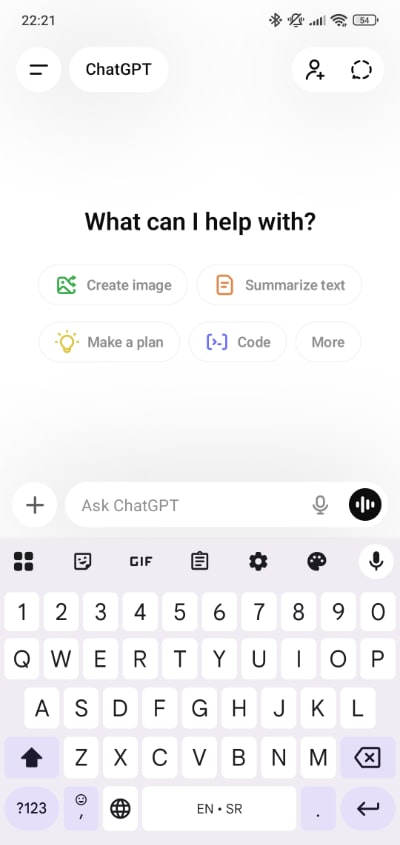
The mobile app includes voice input, so you can speak your prompts instead of typing. Your conversation history syncs between devices when you’re logged into the same account.
Tips for Better Results
Start New Chats for New Topics
Long conversations can cause ChatGPT to lose track of context or mix up information. Start fresh when switching subjects.
Break Complex Tasks into Steps
Instead of asking for a complete business plan at once, ask for the executive summary first, then the market analysis, then financial projections separately.
Fact-Check Important Information
ChatGPT can make mistakes or present outdated information confidently. Verify critical facts, statistics, and current events through reliable sources.
Use System Instructions
Start conversations with instructions like “You are a helpful writing assistant. Keep responses concise and use simple language.” This sets the tone for the entire chat.
Save Useful Prompts
When you find a prompt that works well, save it somewhere. You can reuse and refine effective prompts instead of starting from scratch each time.
What ChatGPT Can’t Do
Access the Internet (Free Version)
The free version doesn’t browse the web in real-time. It can’t check current stock prices, today’s news, or live information. Plus subscribers get web browsing capability.
Remember Past Conversations
Each new chat starts fresh. ChatGPT doesn’t remember what you discussed last week unless you’re continuing the same conversation thread. Plus users can enable memory features.
Guarantee Accuracy
ChatGPT sometimes generates plausible-sounding but incorrect information. It can “hallucinate” facts, citations, or details that don’t exist.
Perform Actions
It can’t send emails, book appointments, or interact with other software on your behalf. It only generates text responses.
Privacy and Data
By default, OpenAI may use your conversations to improve their models. You can opt out of this in Settings → Data Controls → “Improve the model for everyone.”
Avoid sharing sensitive personal information, passwords, financial details, or confidential business data in your chats.
Frequently Asked Questions
Is ChatGPT free?
Yes, there’s a free tier with GPT-5.2 access (with limits). Paid plans include Go ($8/month), Plus ($20/month), and Pro ($200/month) for additional features and higher usage limits.
Do I need to download anything?
No. ChatGPT works in your web browser at chat.openai.com. Mobile apps are available but optional.
Can ChatGPT write my essays or do my homework?
It can, but many schools consider this academic dishonesty. Use it as a learning tool to understand concepts, not to submit AI-generated work as your own.
Why does ChatGPT sometimes refuse to answer?
OpenAI has built-in safety guidelines. ChatGPT declines requests for harmful content, illegal activities, or content that violates its usage policies.
Can ChatGPT generate images?
ChatGPT Plus subscribers can generate images using DALL-E integration. The free version is text-only.
How current is ChatGPT’s knowledge?
ChatGPT has a training data cutoff date (currently 2024 for newer models). For very recent events, it may not have information or may have outdated details. Plus subscribers can use web browsing for current information.
Is my conversation private?
Your chats are stored by OpenAI and may be used to train future models unless you opt out. Don’t share sensitive personal or business information.